Writing
Agent-driven development: build, test, and ship with coding agents
updated 2026-10-19
Agent-driven development means directing a coding agent through a software change you can verify. You supply the goal, context, limits, and acceptance checks. The agent edits files and runs tools. You review the evidence and decide what ships.
You move from typing every line to managing the work. You still need to understand the code that matters, spot bad assumptions, and own the release. An agent can make mistakes fast, so give it a bounded job it can finish cleanly.
We’ll add search to the invented Practice Bike Repair service catalog. You’ll leave with a reusable brief, a review checklist, and a small work record for cost and quality. I’m turning this field guide into a hands-on webinar; see the webinar plans for the planned session. No date or price is set yet.
You’ll need: a coding agent and a separate practice folder. Download the teaching pack, read its instructions, and open website/index.html. It is an original, dependency-free starter with three invented services and no real checkout or customer data.
You’ll finish with: working search, proof of the expected behavior, and a reusable brief. The process guide helps you choose an improvement first; it isn’t required for this exercise.
Jump to the brief, acceptance checks, or release review.
1. Name the result before picking the model
“Improve the site” gives the agent too much room. A useful brief says what happens now, what should happen, and how you’ll check it.
Goal:
Current behavior and reproduction:
Expected behavior:
Relevant files and approved evidence:
Must preserve:
Do not touch:
Acceptance checks:
Release boundary:
Report required:
Talk the context through if that helps you think. Then ask the agent to turn your explanation into this brief. Review its assumptions before implementation.
For our practice site:
Add search to the existing services list.
TUNE should match Tune-up without case sensitivity.
zzzz-no-match should show a useful empty state.
Clearing the field should restore every service.
Give the field a visible label and keyboard access.
Keep existing prices and booking links.
No customer data, payment changes, or new dependency.
Check mobile overflow, run the project checks, and show a preview.
Do not publish.
That’s a small change with a visible result. It also gives a reviewer something better than “looks good.”
- Do: use the search brief with the pack’s starter page. Keep work in your copied practice folder.
- Check: the agent identifies the three existing services and the
#requestlink before editing. - Save: the approved brief and original file so you can compare the change.
2. Inspect the project before broad edits
Start with a read-only tour. Find the repository instructions, source files, package scripts, current branch, uncommitted work, and deployment rules. Never let an agent wipe out another session’s changes just to make its own task easier.
Keep project instructions focused on ownership, build and test commands, release stages, and data boundaries. Don’t turn them into a diary of every past failed attempt. Put standing project facts in the repository file, and move repeatable procedures into skills.
Isolate the change on a feature branch or git worktree. When working on a sensitive system, isolate its data and credentials too. Creating a new git branch does not create a sandbox database.
In our own booking work, passing tests didn’t settle every deployment question. We still had to verify the database target, payment account, webhook, email sender, and host before going live. A green build proves the code compiled in that environment; it doesn’t prove the environment is wired to the right services.
3. Work in short, complete loops
Use this loop:
Inspect → change → check → review → correct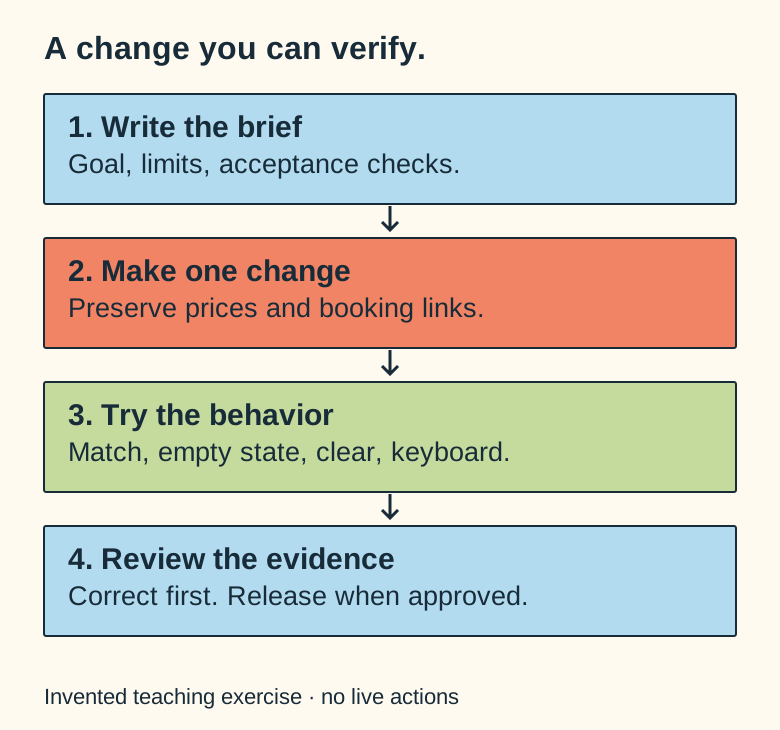
For service search, first find the existing data and render path. Then add matching and an empty state. Then inspect keyboard behavior and mobile layout. You don’t need a new framework, a search server, or an elaborate test suite for a dozen local services.
Use deterministic code for deterministic behavior. Let the model help with interpretation, implementation, and investigation. Don’t ask it to calculate an invoice by prose when the application can calculate it exactly.
Give feedback about the observed behavior:
Searching TUNE works. Clearing the input leaves the empty state visible. Fix that state transition and keep the existing matches.
That’s better than asking the agent to “make it more robust.” Current Claude guidance also emphasizes concrete verification criteria and working in bounded changes. Claude Code best practices.
4. Check behavior, not confidence
Ask for evidence:
Show the diff and exact checks with their outcomes.
List behavior you did not verify.
Try the unexpected inputs and refresh the page.
Check that unrelated prices and links are unchanged.
For our exercise, test uppercase input, no results, clearing, keyboard focus, and a narrow viewport. Don’t write a test that merely repeats the implementation’s internal steps. Check the behavior the user depends on.
For accounts or money, go further: test another customer’s identifier, a replayed request, concurrent changes, forged browser values, provider failure, and recovery. Server-side ownership checks matter even when a button is hidden in the interface.
Bring in a separate reviewer when the stakes justify it. Hand that reviewer the requirement and the diff, and tell it to look for faults. A second agent nodding along with the builder proves nothing; give the reviewer the job of trying to break the conclusion.
Subagents keep their own context and consume usage. They help organize a large investigation, but they aren’t free capacity. Run subagents in parallel for independent research or separated files, and coordinate dependent edits and approvals sequentially. Claude subagents.
- Do: try
TUNE,zzzz-no-match, and clearing the field. Then use the keyboard and a narrow window. - Check: prices remain $75, $25, and $45; the existing request link still works.
- Save: the actual results and any failure before asking for another correction.
5. Use a few skills you understand
Here’s an original teaching example:
---
name: preview-website-change
description: Prepare and verify an authorized website change. Use for a requested preview; do not publish.
---

1. Read repository instructions and inspect Git state.
2. Isolate the requested change.
3. Preserve existing data and unrelated work.
4. Run the relevant checks.
5. Inspect the result on mobile and desktop.
6. Report evidence and unresolved issues.
7. Stop before publication.
A portable SKILL.md includes name and description. Harnesses support different optional metadata and permission fields. Check executable scripts, network calls, licenses, credit, and access changes before installation. Don’t assume a polite instruction can constrain a broadly privileged credential. Agent Skills specification, Codex skills.
The DJH library shows reviewed catalog information and upstream credit. Raw downloads have a separate review boundary. I’d rather have one tested skill that fits the job than a thousand instructions competing for attention.
When you revise a skill, rerun representative cases and negative cases. A shorter file does not prove the skill works better. Evaluating skills.
6. Keep context useful
Feed the agent enough context to act: the exact error, reproduction steps, relevant file, screenshot, source of truth, and requirements. More context helps when it resolves uncertainty, while a dump of unrelated chats buries the signal.
When a task spans sessions, ask for a compact handoff: objective, accepted decisions, completed work, current revision, test evidence, unresolved issues, and next step. Keep original evidence accessible by reference.
For a difficult bug, save the failing example before fixing it. For a visual change, compare screenshots at the same viewport. For provider configuration, record the target environment without exposing secrets.
These habits are less flashy than buying a new model subscription, but they stop you from paying twice to rediscover the same bug.
7. Spend on accepted results
Choose models by the job, then compare results on real tasks; see my 15-minute model comparison and the AI token cheat sheet. A cheaper model can work well for bounded extraction with a deterministic check. A general coding model handles most routine implementation. Strong reasoning models help when architecture is uncertain or a diagnosis is tricky. Treat those as starting choices to test, not a fixed ranking.
Keep one small task record:
| Field | What to record |
|---|---|
| Task and project | Stable references. |
| Harness and model | The actual execution route. |
| Checks | First-pass result and failures. |
| Rework | Corrections required before acceptance. |
| Usage | Reported tokens or credits, when available. |
| Cash | Confirmed charges, distinct from estimates. |
| Result | Accepted, rework, or rejected, with evidence. |
Include reviewer usage and retries. Separate subscription fees, included allowances or explicitly included API credits, extra tool charges, and hosting. A token count multiplied by a list price is a reference estimate, not proof of cash spent or business value.
Claude’s usage/cost reports can help inspect work, but session estimates aren’t authoritative billing for a subscriber. Claude cost management.
I include Muse and Instinct in the operating model even when token figures aren’t available. Accepted work and rework are still worth recording. Missing usage stays unknown.
8. Release a concrete result
Review the preview and exact revision. Run the repository’s required checks. Follow its deployment stages and verify the final URL. Keep code rollback separate from recovery of database writes, emails, or payments.
The same brief should answer what is allowed to ship and what still needs a decision. “Done” means the accepted behavior works, not that the agent ran out of ideas.
- Do: compare the final page and diff with the original brief.
- Check: every acceptance case passes, and any unverified behavior is listed. This exercise needs no public deployment.
- Save: the accepted revision and review record. The speech-to-website guide adds phone input to this same loop.
Video planned, not recorded: a short search demo showing matching, the empty state, clearing, and one real correction if needed. Pause to run the keyboard checks yourself. Read the future shotlists; the written exercise is usable now.
FAQ
Do I still need to read code?
You need enough understanding to assess the result and its risks. Read the changed code where it matters, inspect behavior, and seek qualified review for consequences outside your expertise. Directing agents doesn’t remove accountability.
Should I always use the strongest model?
No. Start with the task’s uncertainty and consequences, then compare cost per accepted result across similar work. Include retries and review. A stronger model can require fewer attempts, but that is something to measure.
Can I start from my phone?
Yes, with a supported authenticated connection to an execution environment. Use dictation to provide context and explicit requirements, then review a preview. The speech-to-website guide walks through that setup; the Claude and Hermes guides cover provider-specific details.
Planned hands-on webinar
Agent-driven development
This guide is the living outline for a future session. No date or price is set yet. The waiting list and registration are not open yet.