Writing
AI CRM automation: research leads, draft outreach, keep control
updated 2026-10-19
A useful AI CRM workflow keeps the prospect, supporting evidence, approved offer, and next action in one place. Let an agent research candidates and draft the outreach. You verify the facts, decide whether to send the message, and record what actually happened.
We’ll work through a five-company research batch, a reviewed CRM update, and one outreach draft. No imaginary revenue, and no “sent” status just because an agent says it finished thinking.
I’m turning this guide into a hands-on webinar. This is the living outline; see the webinar plans for the planned session. No date or price is set yet.
You’ll need: an assistant and a review sheet; an Attio account is optional for the first exercise. Download the Practice Bike Repair pack and read its instructions. All five prospects and their example domains are invented. They teach review decisions, not real research; never import them into your sales pipeline or contact them.
You’ll finish with: a qualification decision, an accurate draft, and a next-action record. For a real pilot, replace the fixtures with verified primary sources and an approved offer.
Jump to roles, CRM fields, draft review, or recording results.
1. Give your agents named jobs
Here’s the operating model I’m adding to my own private workflow:
| Resource | Job | What it doesn’t prove |
|---|---|---|
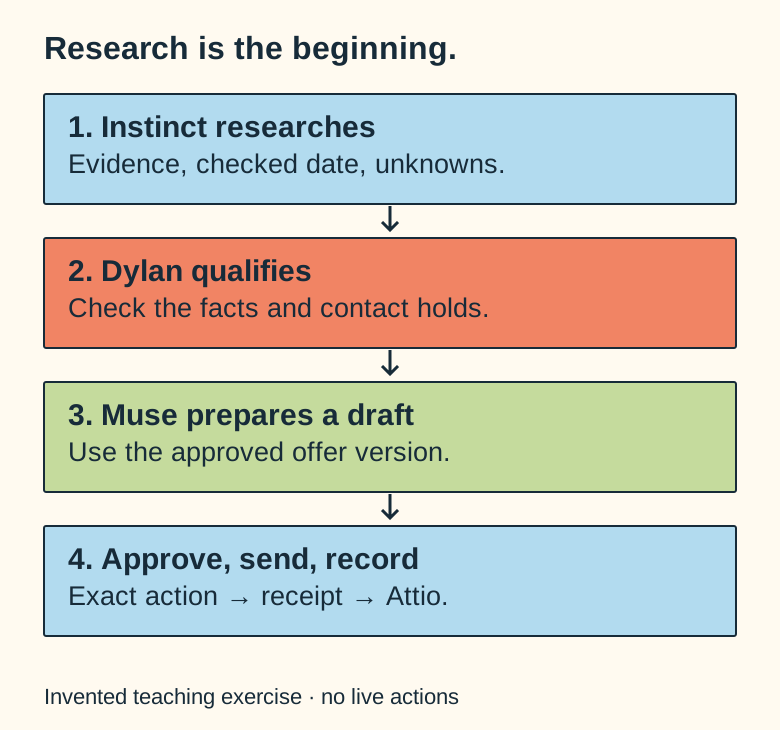
| Instinct | Research candidates and collect source evidence. | A researched company is not a qualified lead or an approved recipient. |
| Muse | Prepare sales and marketing drafts, next actions, and reviewed progress. | A completed draft is not a sent message. |
| Dylan | Approve qualification, offers, external actions, and exceptions. | Approval alone doesn’t establish recipient permission or platform compliance. |
| Attio | Own prospects, contacts, deals, and CRM next actions. | A won deal is not collected payment. |
| Private operations dashboard | Track assignments, sources, versions, and reviewed results. | It doesn’t replace the CRM or authorize outreach. |
| Delivery provider | Report send and delivery evidence. | Delivery doesn’t prove the recipient read or accepted the offer. |
Instinct has supplied research in my workflow. Because its public API, quota reporting, and privacy settings are not verified here, this guide starts with reviewed exports or browser handoffs. Don’t build a pipeline around an undocumented connector.
Muse is Meta’s agent. Meta documents its identity and supported connected experiences, though product capability does not mean a specific account is configured. Check access and data settings before sharing client information. Meta’s Muse introduction, Muse security description.
2. Start with an approved target and offer
Write a target brief that stays narrow enough to review:
Research five independent repair shops in this region.
Use public business sources.
Find evidence of one operational problem our approved offer can address.
Return source URLs and checked dates.
Leave unknown contact details blank.
Do not contact anyone, import records, or create accounts.
Attach the current offer and its version. Never let an agent invent a discount, guarantee, deliverable, or customer result just to make a pitch sound stronger.
For my site, current capabilities and availability remain the reference. Public service checkout is closed. Any outreach draft must respect that availability and never resurrect a package from an old planning document.
3. Reuse the CRM you already have
I use the existing FDE Prospects list and Attio deals pipeline. There’s no reason to create another shadow spreadsheet of “the real leads.”
For a new setup, company and person records plus a prospect list are enough. Inspect the schema before adding fields. These are useful field labels, not claims about your current API names:
| Information | Why keep it |
|---|---|
| Source URL and checked date | Let someone verify the research. |
| Observed need | Separate facts from the agent’s pitch. |
| Offer version | Keep the scope and price consistent. |
| Researcher and drafting operator | Know who prepared each handoff. |
| Accountable owner | Give the next decision to a person. |
| Draft and approval references | Know exactly which version was approved. |
| Delivery state and provider reference | Avoid confusing preparation with delivery. |
| Next action and due date | Keep the lead from becoming a forgotten note. |
| Do-not-contact state | Stop unwanted follow-ups. |
My deals already use Lead, In Progress, Won, and Lost. Research and draft review states can sit alongside those stages; don’t mark a deal won because a draft was accepted.
Keep customer-visible updates separate from internal strategy and raw research.
- Do: map the pack’s
prospects.csvto the field labels above on a review sheet. - Check: the duplicate domain matches an existing reference; the contact hold survives. Invented URLs are not verified evidence.
- Save: your proposed mapping and qualification decisions before any real import.
4. Connect with a read-only check first
In a supported assistant, select Attio’s connector, sign in to the intended workspace, and fetch a known record before allowing any writes. Attio’s MCP guidance explains how to connect the assistant and operate under the signed-in user’s permissions. Other compatible MCP clients can connect through the documented https://mcp.attio.com/mcp endpoint. Attio MCP setup.
That does not mean Muse or Instinct supports this connection in your account. A reviewed export and explicit import is a solid first implementation.
A manually generated Attio API key operates at the workspace level; it does not inherit a private list’s visibility as a narrow per-list boundary. Keep the key on the server, restrict its scopes, and enforce allowed objects and records in your integration. OAuth connections can run with user-level access. Attio authentication.
On Attio’s Free plan, workspace data is broadly visible and editable to workspace members. Don’t invite an agent account and assume it can see only one list. Check your actual plan and permission settings first. Attio plans.
5. Review the research before importing
Open each source link. Does it refer to the right business? Does it support the claim? Is the information still current? A shop that asks customers to call for repair status might benefit from a status page, but that does not prove staff lose a specific number of hours each week.
Match companies by domain and people by verified email or existing record ID. Preview your import mappings, leave unknowns blank, and keep manually approved values intact. Attio’s CSV import behavior depends on identifiers and selected update options; don’t assume every CSV import automatically deduplicates list entries. Attio CSV imports.
Use a small batch first. Check duplicates, incorrect entity matches, and accidental overwrites before importing hundreds of rows.
6. Ask Muse for one useful draft
Here’s a bounded assignment:
Prepare one outreach draft for this approved prospect.
Use only the attached evidence and offer version.
Explain one observed issue and one useful next step.
Do not imply we have spoken before.
Do not invent savings, customers, endorsements, urgency, or guarantees.
Return recipient, channel, draft, supporting sources, and review questions.
Do not send.
The message should sound like someone noticed a real problem and has a reasonable next step. It doesn’t need a sales essay.
Our invented repair shop asks customers to phone for status updates. A draft could propose discussing a simple customer-status page. It should not claim “I can save you $10,000” when nobody measured the workload.
An agent could also prepare a small website or feature preview. Keep that preview clearly marked as a proposal. Don’t scrape a business’s identity into a public site, change its accounts, or imply it endorsed the work.
- Do: prepare a practice draft for
PROSPECT-01; flagPROSPECT-02for its unsupported assumption. - Check: the message makes no invented savings claim, names no fabricated customer, and stays a draft.
PROSPECT-03remains on contact hold. - Save: the exact draft, source references, offer version, and the review question in
work-record.md.
7. Approve the exact action
Review the recipient, channel, sender, full text, links, attachments, and offer version. If one of those changes materially, review again.
Muse’s documented connector rules require approval for sensitive writes. That’s helpful; connecting an account still isn’t blanket authority for every future message. Muse connector documentation.
Permission to operate the tool and permission to contact a recipient are different questions. For US commercial email, CAN-SPAM covers B2B messages too: accurate identity and subject, postal identification, opt-out handling, and oversight remain relevant when an agent or provider helps send. Public contact information is not unrestricted permission to market in every jurisdiction or platform. FTC guidance.
Keep a suppression record and check it before each approved action. An opt-out is a stop, not a prompt to try another channel.
8. Record what happened, not what you hoped
A practical handoff moves through research, review, qualification, draft, approval, and delivery. It also needs blocked, not-a-fit, do-not-contact, and outcome-unknown states.
Save the provider receipt or visible sent record before marking a message sent. If the send times out, check whether it was accepted before retrying. You don’t want a customer getting the same “personal” message three times.
A reply becomes a proposed next action. It doesn’t authorize a new scope, automatic follow-up, or price promise. Put the current next action back in Attio so the person reviewing the pipeline sees it.
My operations preview records real assignments with a prospect reference, task, evidence, and approved offer version. Accepted and rework results feed the usage ledger. It does not automatically dispatch outreach or write deal stages. Those connections need their own verified setup.
9. Count results that mean something
For a first pilot, count researched records, accepted records, corrected records, approved drafts, verified sends, replies, and qualified conversations. Keep collected payments separate from deal value.
Muse and Instinct can be useful even when they don’t expose token counts. Record the work and the review result. Leave unknown cost and quota figures unknown.
Before expanding, test these cases:
- Import the same company twice.
- Provide a source that contradicts the proposed claim.
- Leave the email missing.
- Mark a prospect do-not-contact.
- Change the offer after the draft was prepared.
- Simulate a send with uncertain provider acceptance.
- Check that private notes cannot enter a public export.
- Do: walk through an uncertain-send scenario without actually sending. Ask what status evidence would settle it.
- Check: a draft never becomes “sent” without provider evidence, and retrying would not create a duplicate action.
- Save: the blocked or unknown state and next owner. The public Client Operations map is a sanitized example of this review flow.
Video planned, not recorded: a bad research claim, a contact hold, and a corrected draft using these invented fixtures. Any example provider receipt will be visibly labeled simulated. Read the future shotlists. The process guide helps choose the improvement; the development guide covers building a small preview for it.
FAQ
Can Muse and Instinct share one pipeline?
Yes, as an operating model: Instinct researches, Muse prepares the next action, and the accountable owner reviews. Use verified connections or explicit handoffs. Don’t assume either product can consume every connector.
Do I need automatic sending to get value?
No. Clean research and a good reviewed draft remove useful preparation work. Add delivery automation only when recipient rules, exact approval, suppression, and receipts are tested.
What should I track if token usage is unavailable?
Track accepted and rework outputs, source evidence, and meaningful sales progress. A list-price estimate or guessed token count doesn’t establish revenue or savings. See the process improvement guide for the pilot method.
Planned hands-on webinar
AI CRM automation
This guide is the living outline for a future session. No date or price is set yet. The waiting list and registration are not open yet.