Writing
Create a consistent AI character with Pixio
updated 2026-10-21
To keep an AI character consistent, approve one portrait, save its fixed traits, and reuse both for every new image. Build a reference sheet from that portrait, and inspect every face before generating video. A longer prompt alone won’t keep a face from drifting.
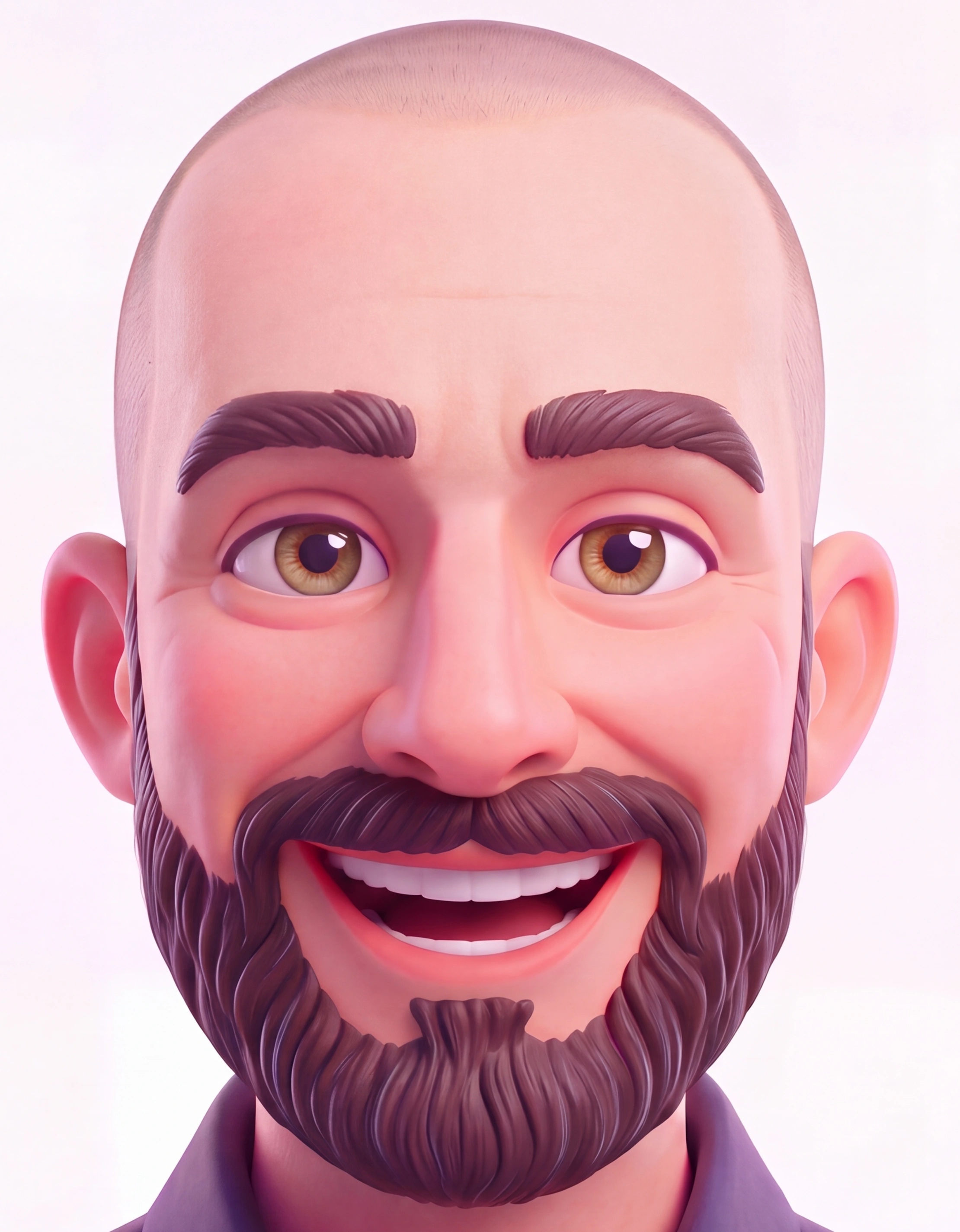
My latest example is a collectible-style version of me, made with Pixio. I approved two full profiles: one with glasses and one without. They share the same face, short beard, navy shirt, and broad smile. This guide follows that process, then shows earlier fictional portraits and the Saturday cartoon cast. The character studies were generated with AI; the two large Dylan boards combine reviewed studies in a locally assembled layout.
What is in this guide?
- The two reference methods
- Choose the face
- Build a production sheet
- Create a detailed face reference
- Review and repair
- Test motion
- Keep a cartoon cast consistent
- Models and recorded costs
Two useful methods from M. Asif
Credit goes to M. Asif (@meAsifAi). His first post uses a broad production board: poses, expressions, materials, and proportions. His second post concentrates on one face, with 24 studies of angles, expressions, clothing, and close details.
The templates below are our adaptations. Read his posts for the original prompts. We used our own characters, not the woman in his examples.
| Need | Use |
|---|---|
| Poses, clothes, props, and animation planning | The broad production board in step 2 |
| Closer checks of a realistic face | The 24-study sheet in step 3 |
| Several cartoon characters in one scene | Separate cast sheets in step 6 |
1. Choose the face first
Start with the portrait you want to keep. For my character, the important details were specific: natural green-hazel eyes, a narrow nose bridge with a slightly raised tip, a fuller jaw, and a short, mostly brown beard. I wanted a huge smile without deep under-eye bags or heavy cheek creases.
That took several passes. One pair looked close at first, but the glasses version had more wrinkles and gray than the version beside it. I chose the younger face without glasses. That exact portrait became the reference for both versions. The older face supplied only the shape of the frames.
This is a useful distinction: a reference can define one accessory without defining the person wearing it. Give each image one clear job.
If you need a first portrait, adapt this prompt. Choose the art style you want rather than asking every character to become a photograph:
Create one portrait of [CHARACTER].

Reference 1 defines the face and apparent age.
Keep the eyes, nose, jaw, hairline, facial hair,
and recognizable proportions from that reference.

Style: [collectible figure, illustration, photograph].
Clothes: [garments, colors, accessories].
Expression: [specific expression].

Use soft studio light and a plain background.
Show the whole head. Make one portrait, with no labels.
Do not add accessories or change the person's age.
Already have the right portrait? Save it and skip that generation. Keep earlier versions in an archive, but remove them from the inputs for new work.
My fixed notes became:
Dylan: a cheerful collectible-style adult in his mid-30s.
Near-shaved scalp, natural green-hazel eyes, fuller jaw.
Narrow nose bridge; compact, subtly raised nose tip.
Short, even, mostly brown beard with sparse gray.
Broad white-tooth smile and soft cheeks.
Keep the laugh lines; avoid deep bags or cheek pits.

Dark navy long-sleeve dress shirt, open collar.
Thin gold chain without a pendant, charcoal slacks,
brown belt, and dark brown Italian-style shoes.

Glasses variant: dark rectangular acetate frames,
softly rounded corners, and clear, colorless lenses.
The glasses must not change the face or beard.
2. Build the sheet

A reference sheet should make errors easy to find. For this character, I wanted enough detail to check the head, body, clothes, expressions, and both sides of the face. I also wanted a complete version with glasses and a complete version without them.
Nano-Banana 2 Edit generated the studies from the approved portrait. We reviewed the results, repaired specific problems, then assembled the accepted crops into two 10,000 × 7,000 boards. That is the final board size, not the native resolution of one model output.
Each board contains eight body angles, six expressions, six poses, and eight details. It also includes a large identity portrait, a full-body study, sampled colors, and a silhouette. The assembly scales crops to fit; it does not stretch them or mirror a missing view.
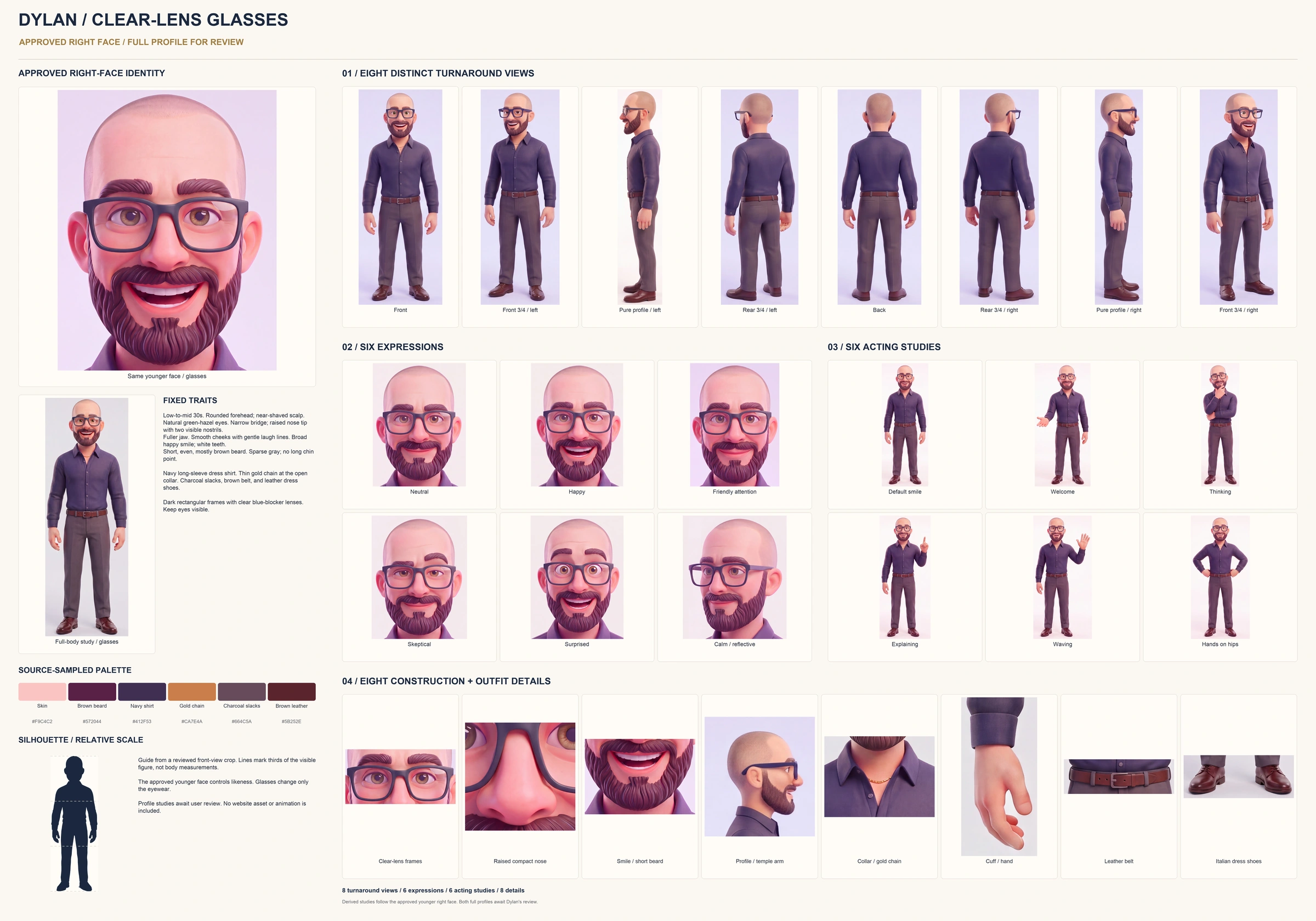
Download the full profile with glasses (JPG).
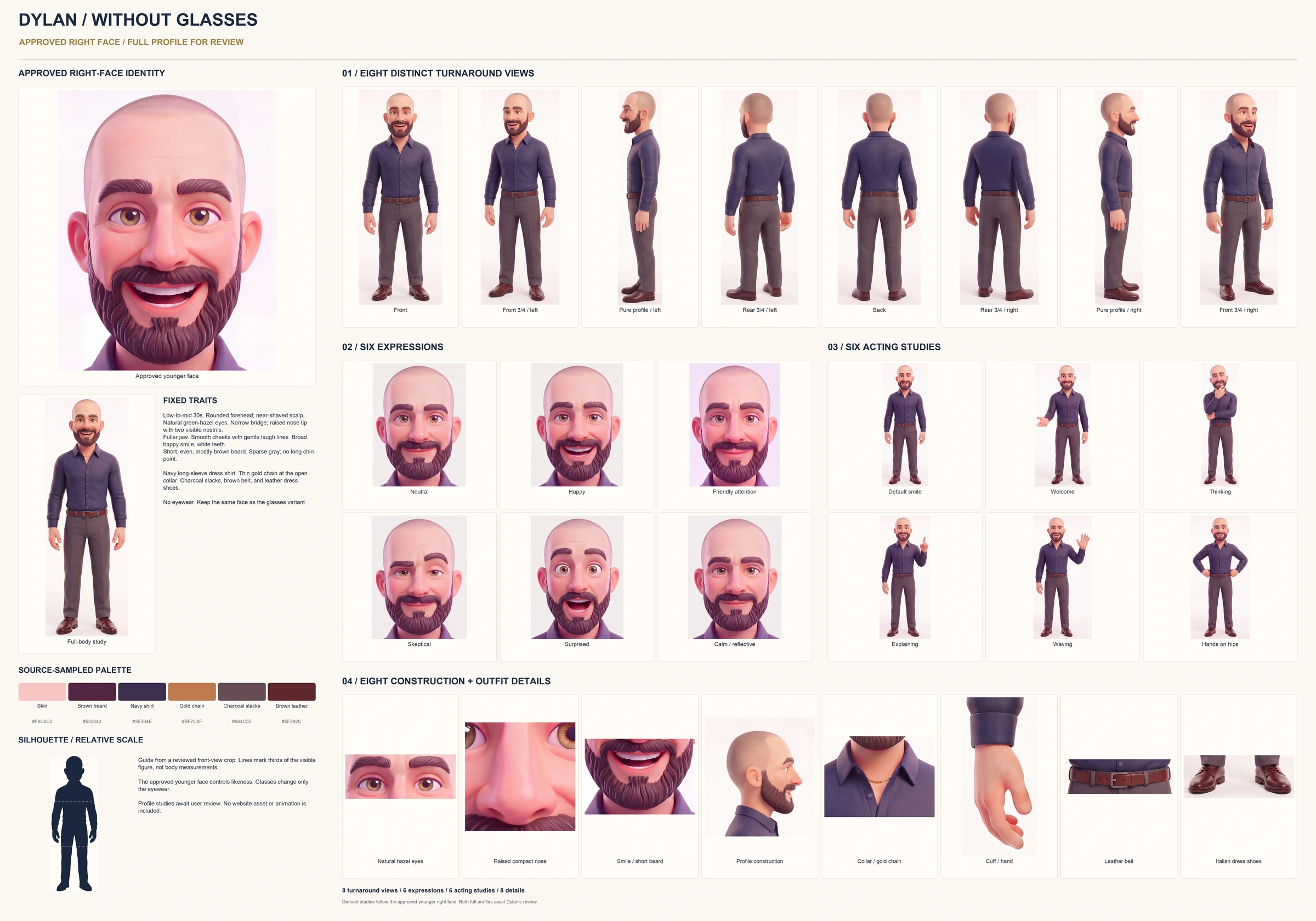
Download the full profile without glasses (JPG).

Generate small groups, then assemble
A single enormous board prompt can hide mistakes in tiny faces. Smaller groups let you inspect each study before it enters the finished sheet. Give every group the approved portrait and fixed notes. Keep only the references that help with that group.
For a new character, use this brief to plan the studies. Generate the groups separately if one output cannot keep them clear. Download the reusable prompts.
Create reference studies for [NAME].
The approved portrait defines the face and apparent age.

Fixed traits: [face, eyes, nose, hairline, facial hair,
build, clothes, colors, shoes, and accessories].
Style: [the approved art style].

Keep the light, camera height, and proportions steady.
Use a plain background and space between the studies.

Generate these groups for review:

1. Eight complete body angles
Front; front three-quarter left; left profile;
rear three-quarter left; back; rear three-quarter right;
right profile; front three-quarter right.
Show head to shoes at the same scale.
The two profiles must show opposite sides.

2. Six expressions
Friendly neutral, happy, focused, amused, delighted,
and thoughtful. Change the expression, not the person.

3. Six complete poses
Relaxed stance, welcome gesture, thinking, explaining,
waving, and hands on hips. Keep the outfit fixed.

4. Eight details
Scalp and brows, left profile, right profile, smile
and beard, collar and chain, cuff and hand, belt
and trousers, shoes. Adapt these to the character.

Inspect every output before assembling the board.
Keep one large approved portrait beside the studies.
Add colors sampled from the accepted images and
an evenly scaled silhouette of the reviewed figure.

Do not crop heads or feet, add accessories, duplicate
angles, stretch the body, or mirror a missing view.
For the second version, change only the glasses:
Reference 1 is the approved character without glasses.
Reference 2 defines only the glasses: dark rectangular
frames with softly rounded corners and clear lenses.

Put those glasses on the character in reference 1.
Keep his face, apparent age, eyes, smile, cheek detail,
beard shape, beard color, clothes, and lighting.
Do not copy a face from the accessory reference.
Then compare the pair at the same size. Glasses can obscure the eyes and nose bridge, so approve the uncovered face too. A matching outfit is not enough if the two faces have different ages or beard colors.
3. Make a closer face reference
For my two boards, the large portrait stays beside the smaller faces. Check the eyes, nose, smile, and beard there before judging the full-body views. A small head can hide a longer nose or a different jaw. The sheet helps with angles and clothing; it does not replace the portrait as the identity reference.
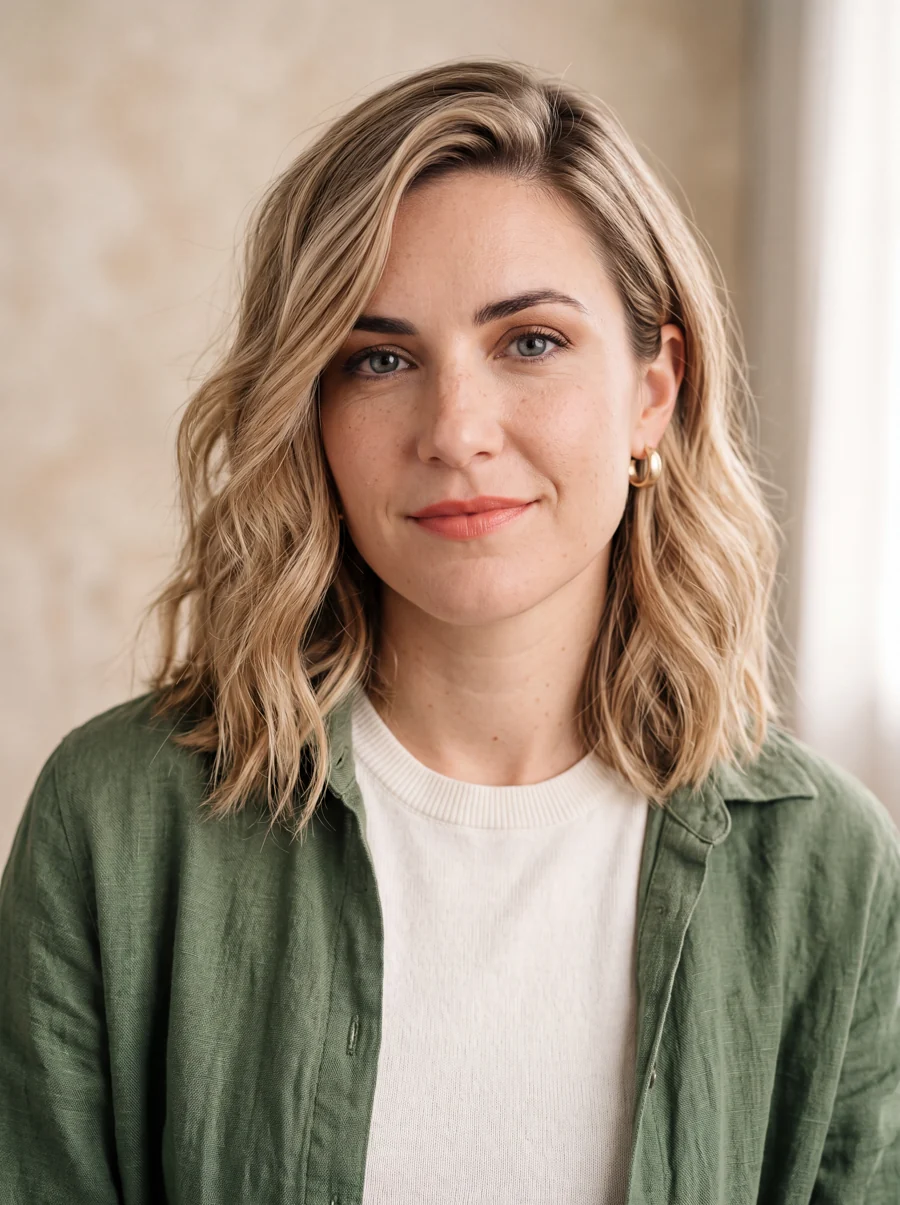
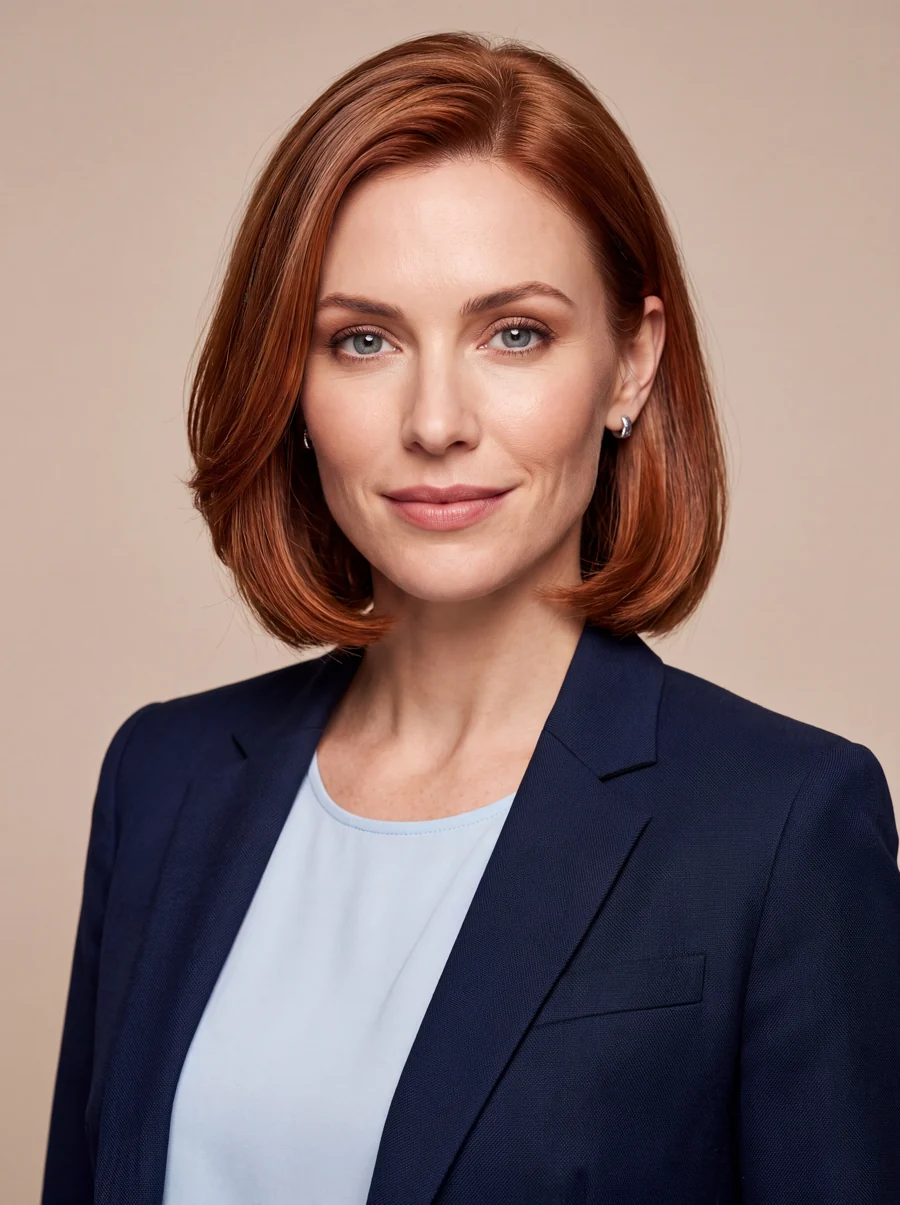
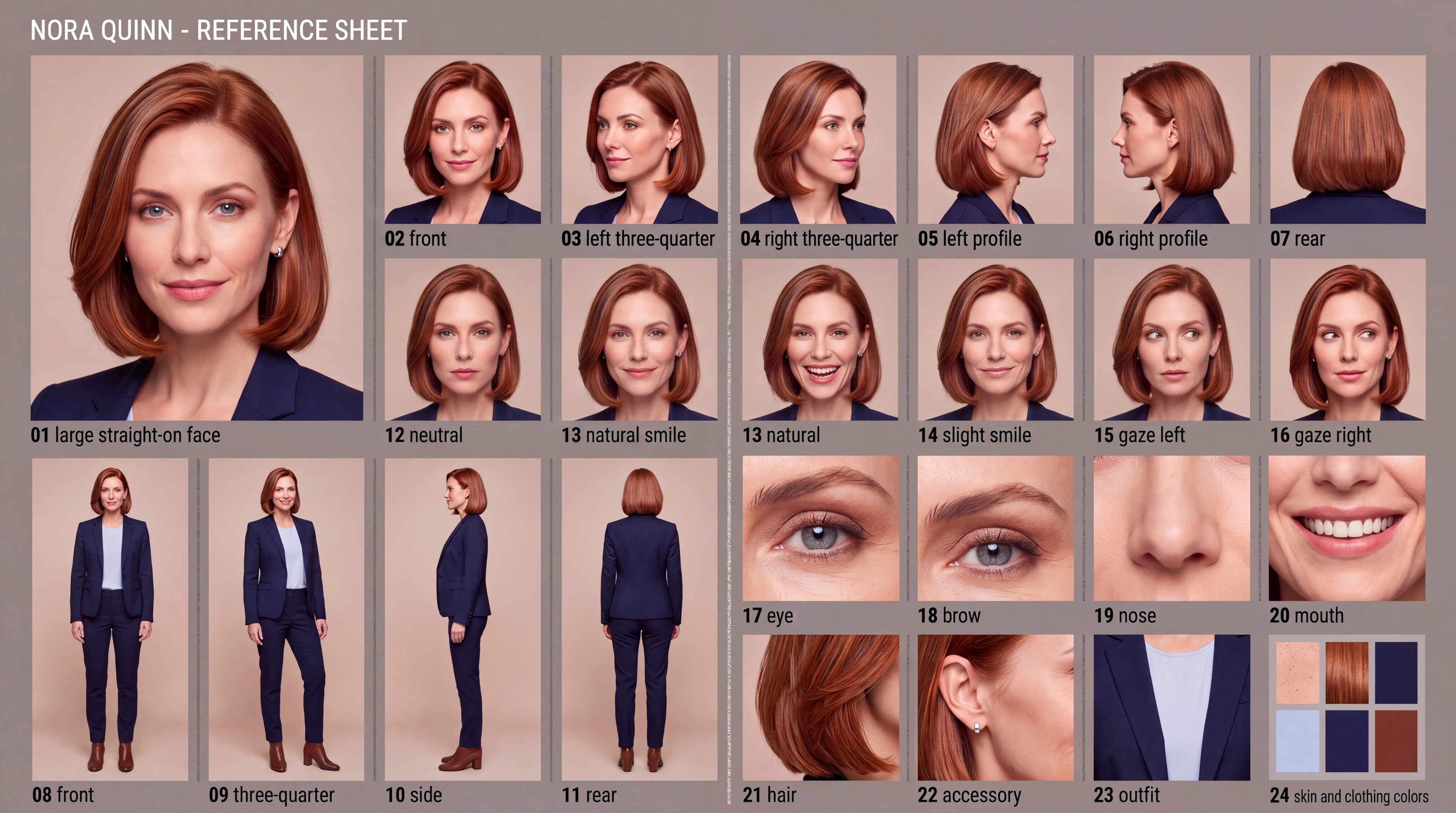
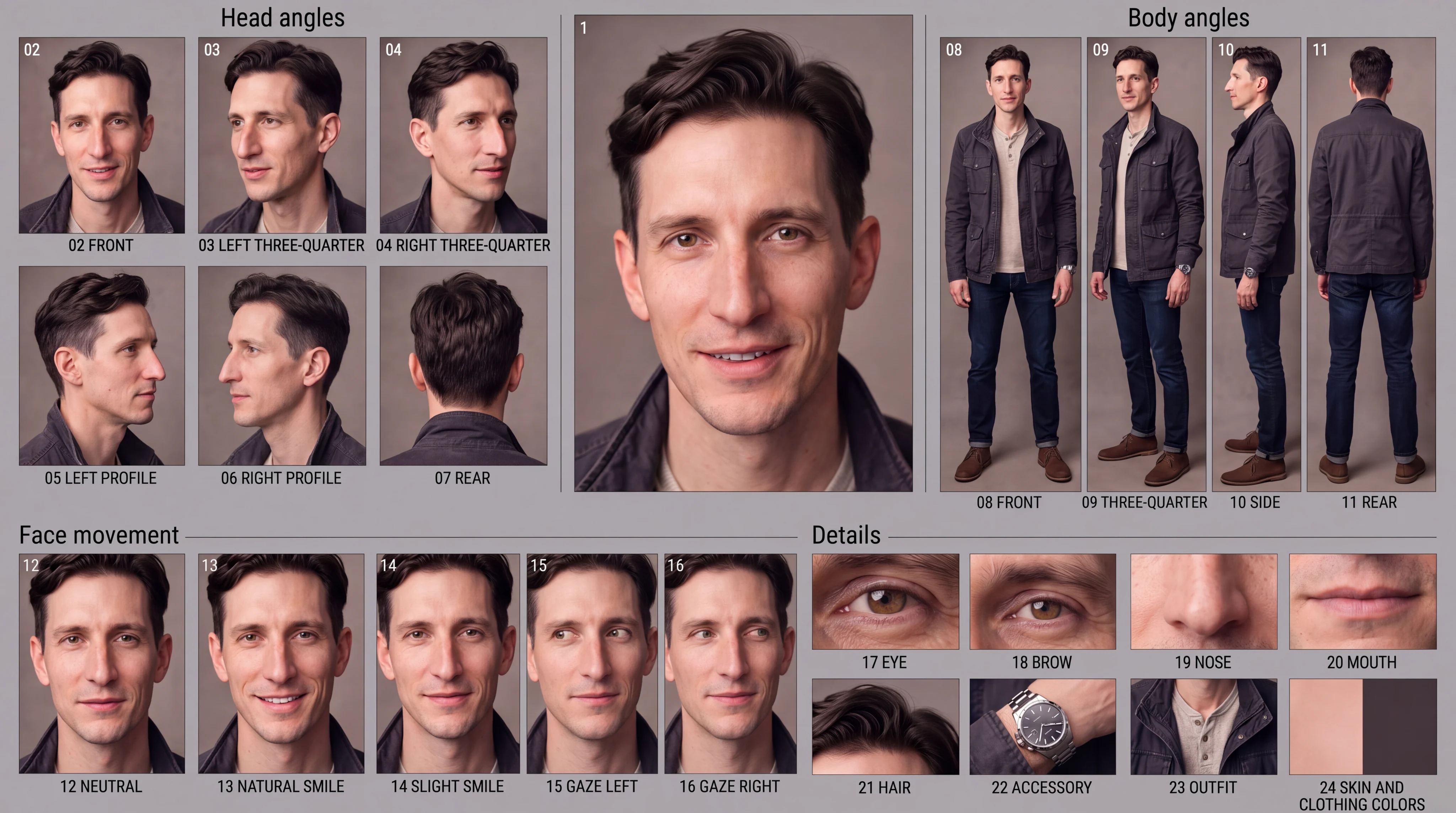
Asif’s second method adds closer facial studies. In an earlier test, we used it on three original fictional adults. Their briefs borrowed broad cues from Scarlett Johansson, Dana Scully, and Fox Mulder while giving each character a distinct name, face, and wardrobe. No actor photos were uploaded.
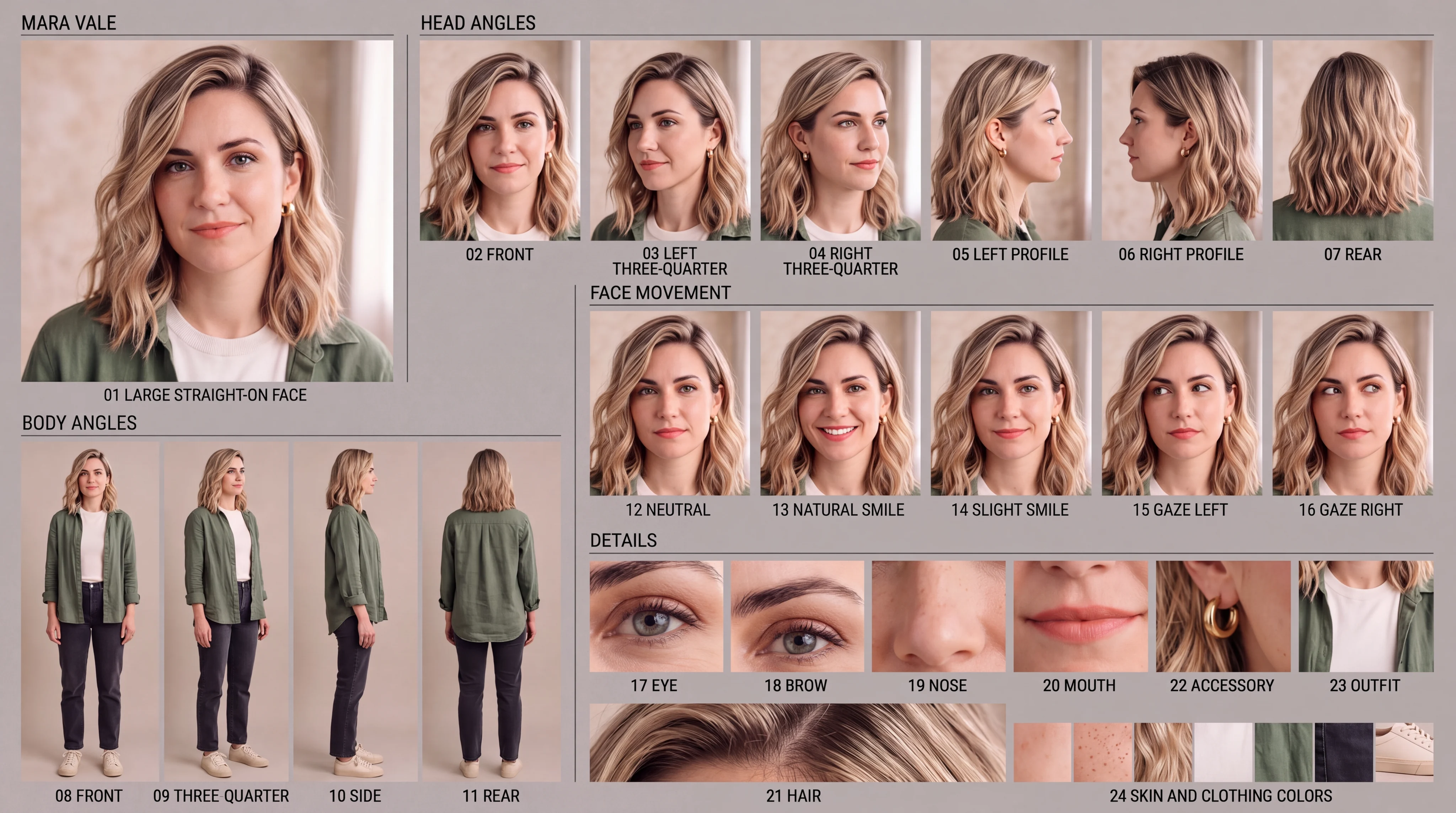
Nano-Banana 2 generated the portraits from text at 3:4 and 4K. After refining the hair, makeup, and expressions, we approved each portrait and fed it into Nano-Banana 2 Edit for a 16:9, 4K reference sheet. Each sheet received only that character's portrait.

The reusable face-sheet prompt
Attach one approved portrait. Replace the bracketed notes. This shorter template keeps the structure from Asif's second post:
Make a photographic reference sheet for [NAME].
The attached portrait defines the identity.
Keep the face, age, eyes, nose, mouth, jaw, skin,
hairline, hairstyle, and build consistent.
Do not beautify or replace the face.
Infer unseen angles without adding new traits.

Fixed outfit and accessories: [DETAILS].

Use a wide studio board with a large main portrait,
soft even light, thin dividers, and short labels.
Include these 24 studies in clear groups:

Identity: 1 large front face.
Head: 2 front; 3 left three-quarter; 4 right three-quarter;
5 left profile; 6 right profile; 7 rear.
Body: 8 front; 9 three-quarter; 10 side; 11 rear.
Expression: 12 neutral; 13 natural smile; 14 slight smile;
15 gaze left; 16 gaze right.
Details: 17 eye; 18 brow; 19 nose; 20 mouth; 21 hair;
22 accessory; 23 outfit; 24 skin and clothing colors.

Keep full-body figures at equal scale, head to shoes.
Show natural skin, hair, and fabric. Keep the same light.
Avoid altered faces, plastic skin, wrong proportions,
cropped feet, overlapping figures, and extra limbs.
Change the expression without changing the person.
Mara Vale: warm screen presence
Mara uses dark-rooted golden-blonde waves, gray-green eyes, light freckles, and a compact, curvy athletic build. Her moss overshirt, ivory top, charcoal jeans, and small brass hoops give her a repeatable look.
Nora Quinn: the composed scientist
Nora has a copper bob, blue-gray eyes, and an elongated heart-shaped face. Her navy suit, pale blue blouse, and silver studs borrow Scully's restrained style without using the character's identity.
Evan Mercer: the curious investigator
Evan has tousled dark hair, hazel eyes, a prominent nose, and a trace of stubble. A charcoal field jacket and oatmeal henley replace the formal agent suit. Keep his steel watch on his left wrist.
Download the three profiles and exact generation prompts. Keep these notes with the portraits. New outfits can come later; establish the face first.
4. Check every panel
Compare each face with the portrait. Check hair, clothing, hands, props, and rear views. Count the panels. Check what a panel shows, not just its label.
Evan’s first sheet repeated one side profile. A focused edit restored the opposite view and corrected one gaze direction. Nora’s first sheet duplicated views and omitted a gaze study. Mara’s figures were correct, but three section headings were wrong. The edits fixed Evan’s views and Mara’s headings. Nora’s edit kept an extra smile panel and did not reverse the left gaze. Her portrait remains the face reference; do not rely on those labels. These are the kinds of errors a quick glance misses.
My new sheets had a different trap: a requested right profile came back as another left profile. A label could not make it the missing angle. We generated the opposite view, checked its direction, and used the accepted view in the final board. We also compared the glasses and no-glasses faces for wrinkles, beard color, and nose shape.
To repair a bad panel, attach both the sheet and the original portrait, name the single error, and ask to change only that area. Then inspect the new output.
Reuse the large portrait to anchor identity, and use the sheet for wardrobe, poses, and angles. Treat the sheet as a visual guide, not a rigged 3D model.
5. Test the character in motion
Approve a scene image or full-body pose before sending it to a video model. The two Dylan profile boards document the design. They do not prove that a new animation will preserve it.
Start with a short, simple action. Ask for a small gesture before trying walking, talking, or prop handling. For example:
Animate the approved character in this scene.
Keep the face, apparent age, nose, eyes, beard,
glasses, clothes, and body proportions consistent.

Action: [one small, clear action].
Keep the camera still and the lighting steady.
Preserve the pose at the start and end if making a loop.
Do not add speech, props, or unrelated gestures.
Watch the whole take. Check the nose and beard during the gesture, the lenses and frame shape, the hands, and the return to the starting pose. Test the version you will actually use; success without glasses does not prove that the glasses will stay stable.
Keep a matching still as a fallback. A clean reference image helps, but each clip still needs its own review. The earlier Saturday project below shows what that review looks like across several characters and shots.
6. Build a small cast: Saturday
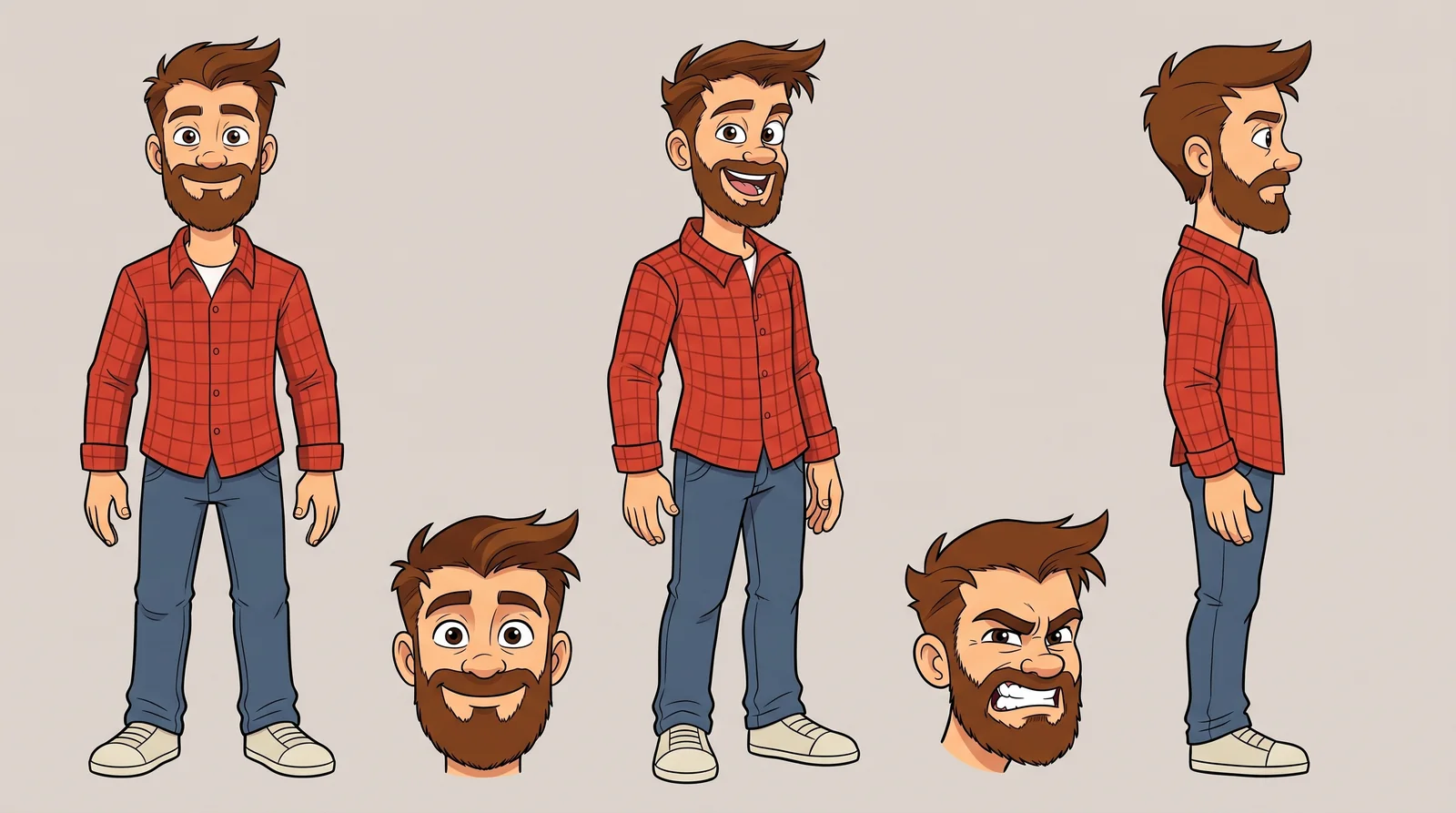
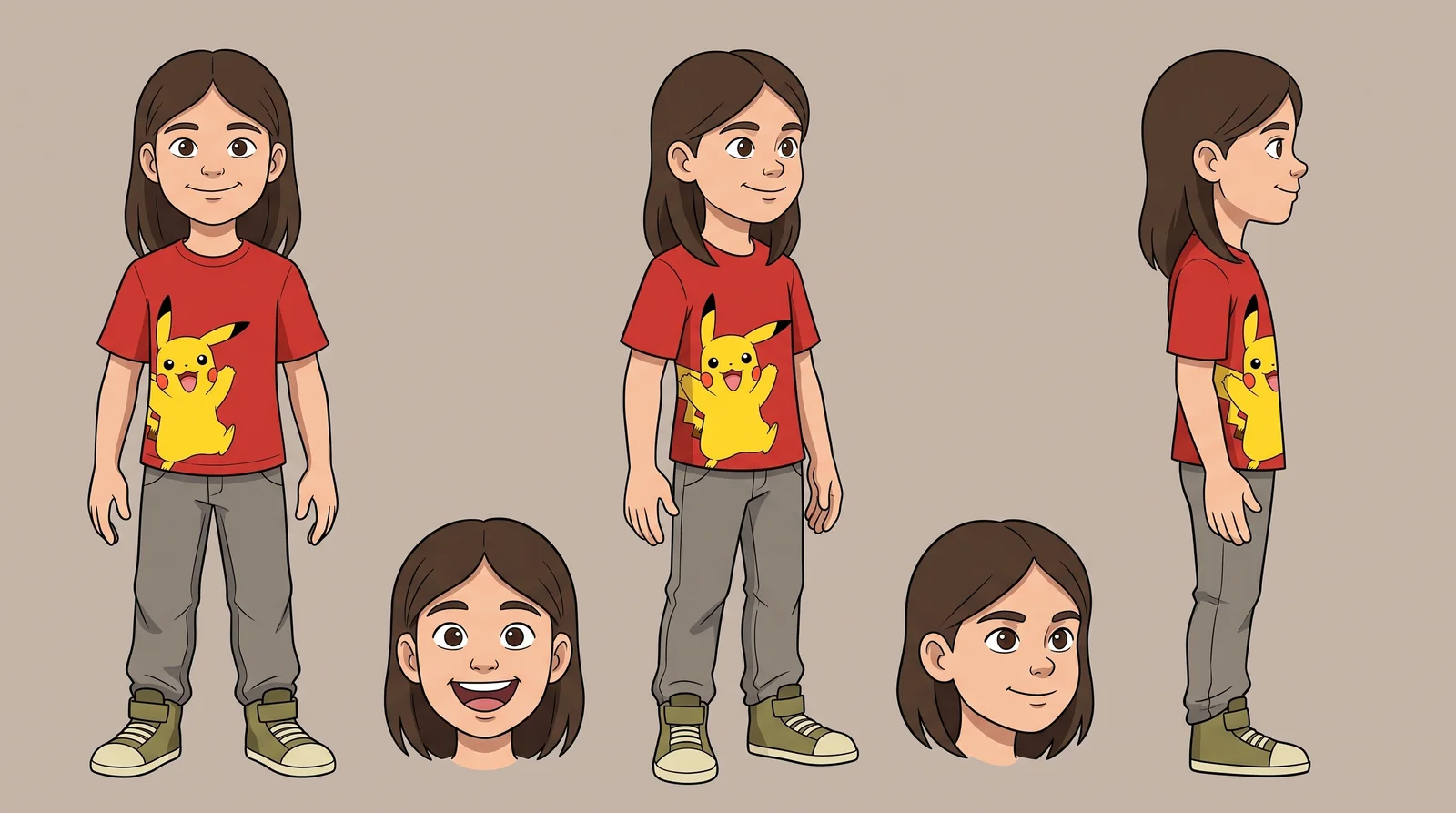
For my Saturday song, we kept the cartoon style. Nano-Banana 2 Edit made Dad's sheet, then a separate sheet for each child. We requested 16:9 at 2K.
Start with the lead character
The project used the earlier fictional Nerd Dad illustration. It defined his face, hair, beard, and red shirt. His sheet added a full body and clear expressions for animation. This historical cast is separate from my newer collectible character above.
Give each reference one job
For each child, a supplied photo defined the appearance. Dad's sheet defined only the drawing style and layout. This kept the cast visually related without copying Dad's adult features.
Adapt this shorter sheet prompt for each new cast member:
Create one cartoon character sheet for [CHARACTER].

Reference 1 defines this character's appearance.
If it contains several people, use [which person].
Reference 2 defines only the drawing style and layout.
Do not copy its face, age, hair, body, or clothes.

Keep: [face, hair, build, outfit, colors, shoes].

Show front, angled, and side full-body views,
plus two close-up expressions. Use one plain background.
Keep every view consistent. Show all hair and shoes.
Keep hands empty so the outfit stays visible.
Use clear outlines, flat colors, and simple shadows.
Fix the design before making scenes
The girl's first sheet had brown hair. We changed only the hair color to golden dirty blonde, then saved the corrected sheet as the new reference.
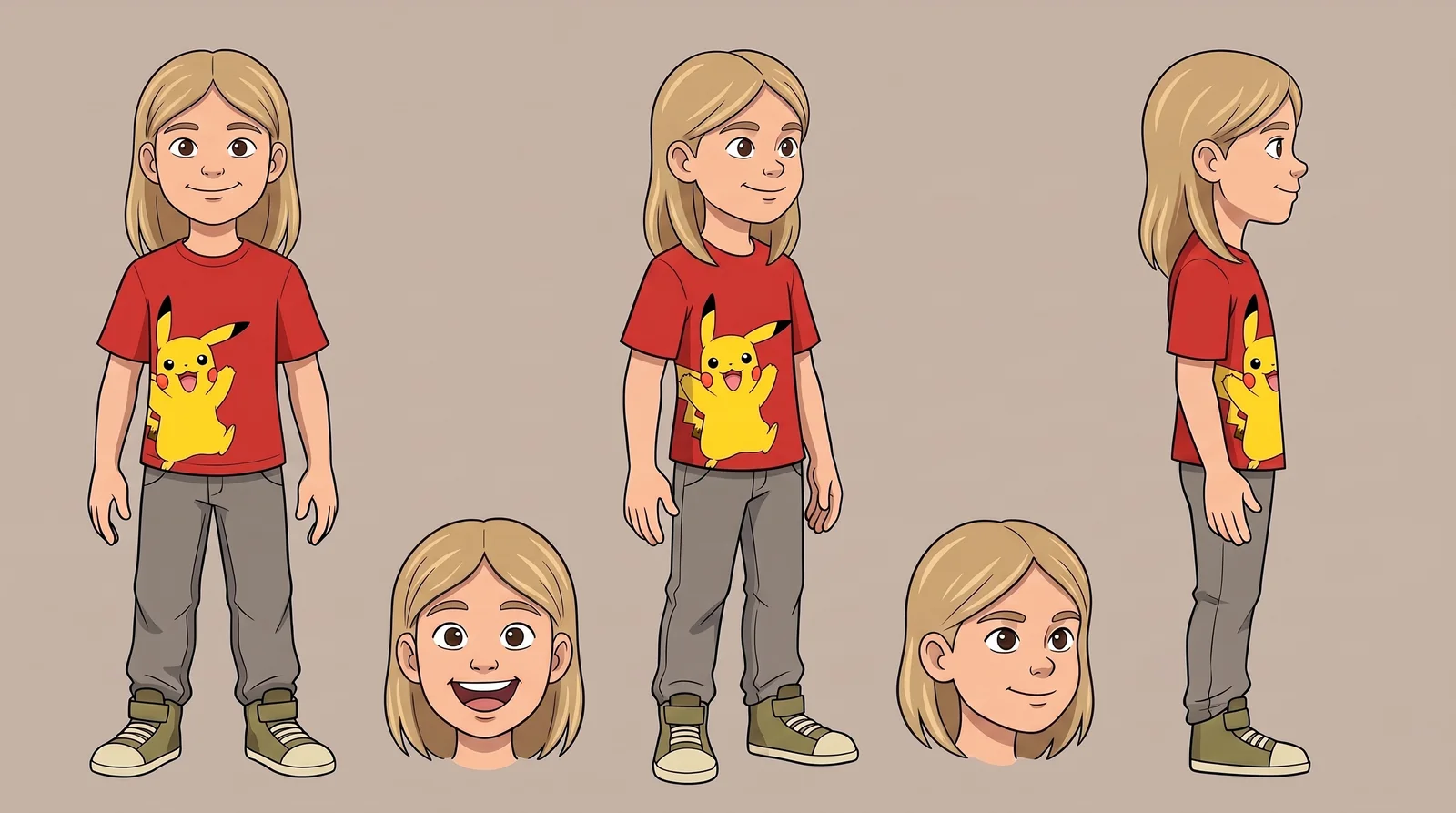
The repair prompt kept the change narrow:
Edit this character sheet. Change only [specific trait]
in every view and close-up to [exact description].

Preserve the face, proportions, poses, clothes,
other colors, outlines, shading, and page layout.
Do not change anything else. Apply the fix to every panel.
The other child's short brown hair, gray shirt, and dark jeans made the two designs easy to tell apart.
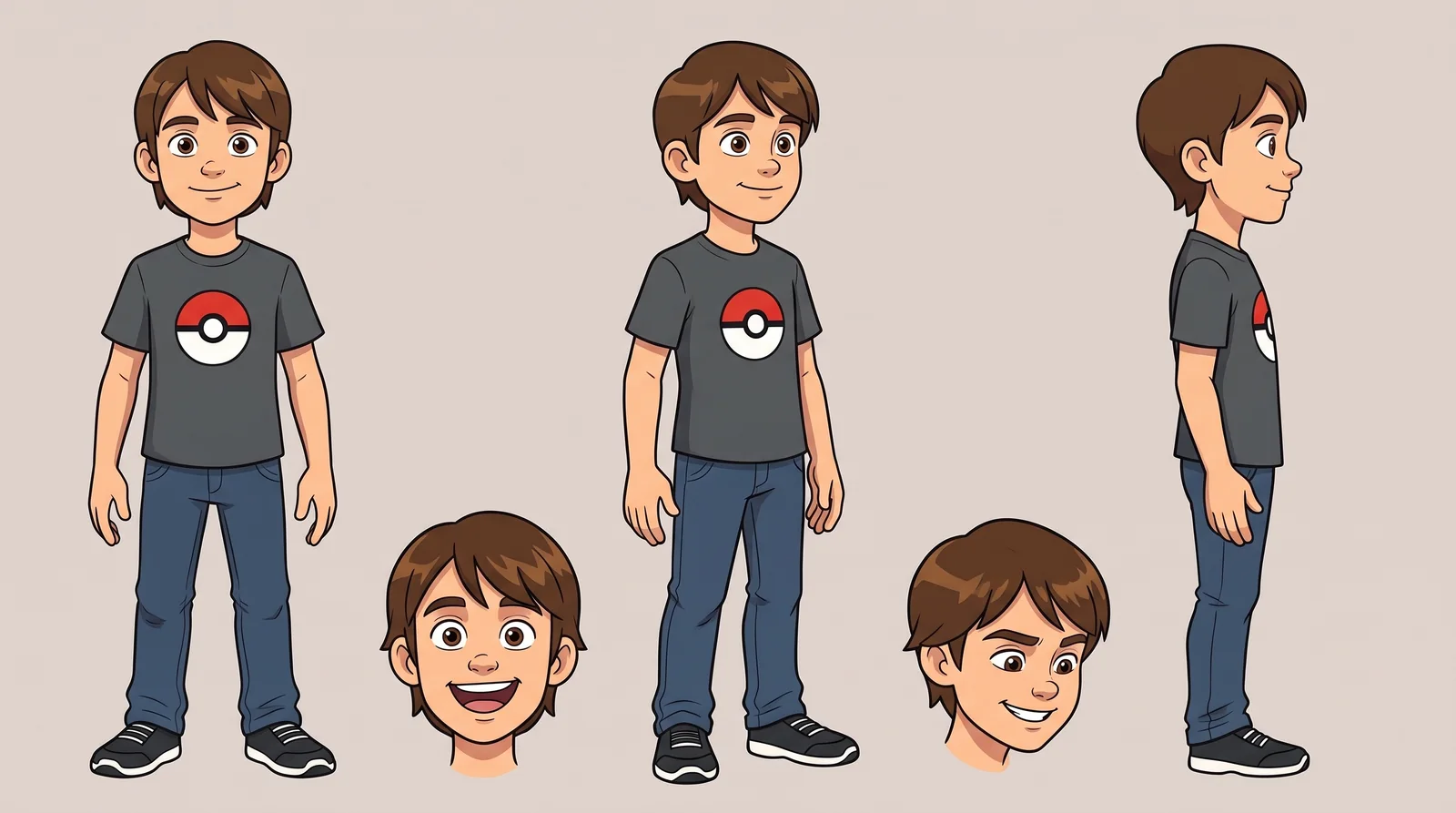
Save a short written profile beside each approved sheet. Record the outfit, colors, hair shape, and height relative to the other characters. Archive the old references after a correction, and remove them from the inputs for new scenes.
Keep the props consistent too
The truck and card boxes recur across shots. They received their own sheet: one dark blue pickup and broad, shallow white storage boxes.
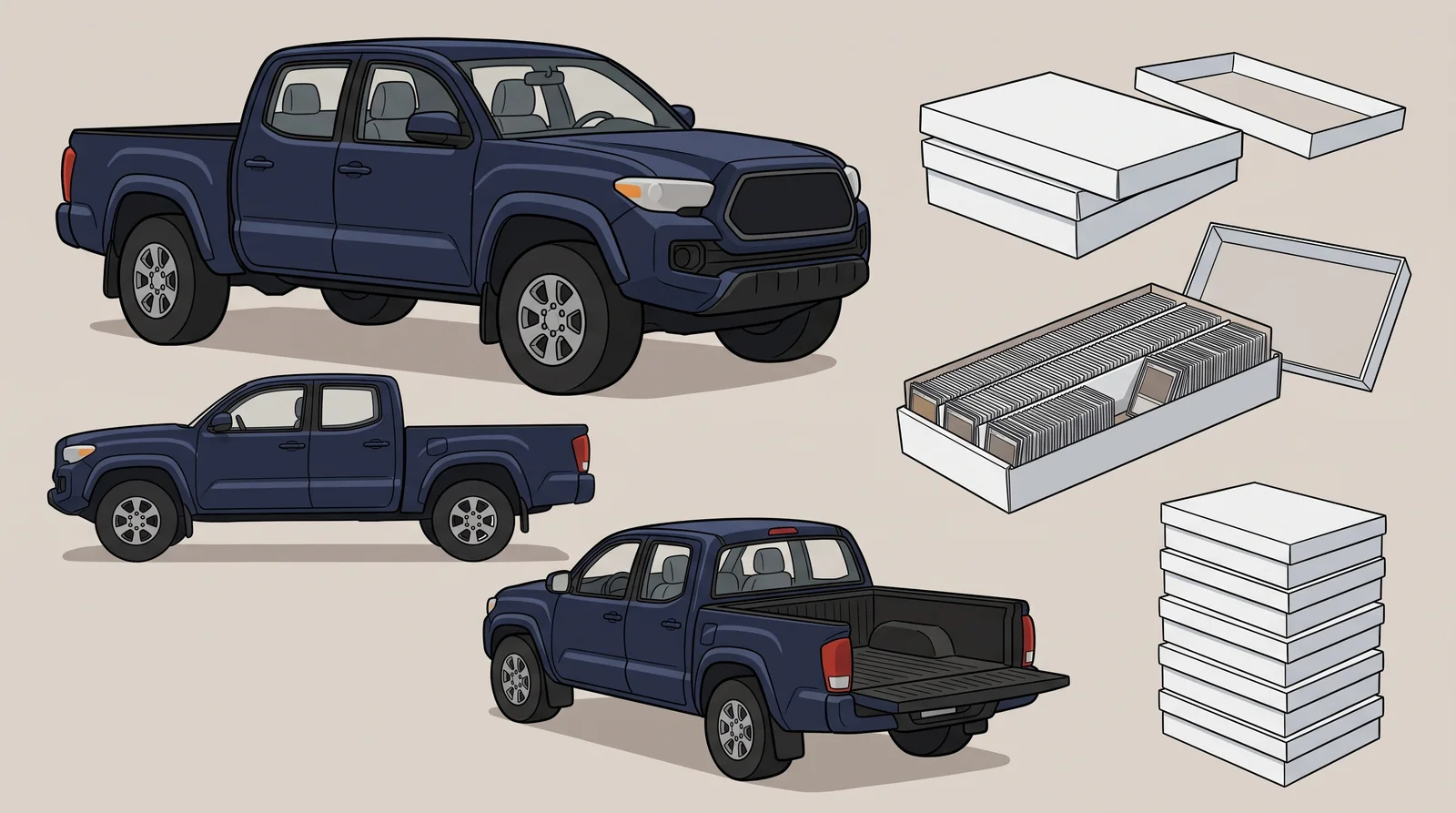
Approve the shared scene before motion
We supplied four references with explicit roles:
| Reference | Defines |
|---|---|
| 1. Dad's sheet | Dad's face, build, and clothes |
| 2. Girl's corrected sheet | Her golden hair, face, and outfit |
| 3. Boy's sheet | His short hair, face, and outfit |
| 4. Scene reference | Storefront, truck, and boxes |
State who stands where, who is taller, and what each person does. Our first family frame hid part of Dad's face behind the boxes. We repaired that before generating motion.
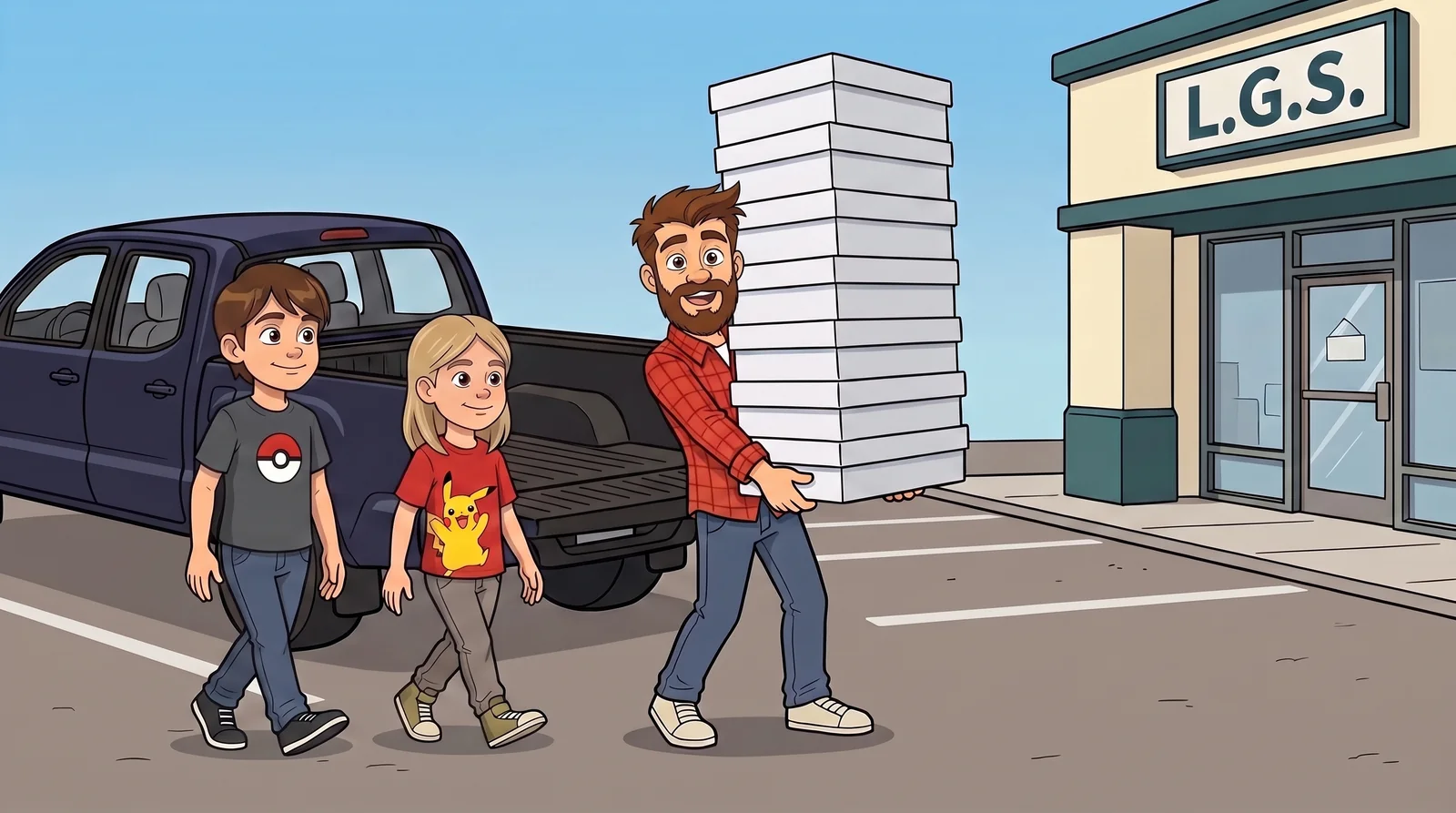
Compare the characters across shots
These frames show our joined 20-second opening preview. Later production work is outside this example.
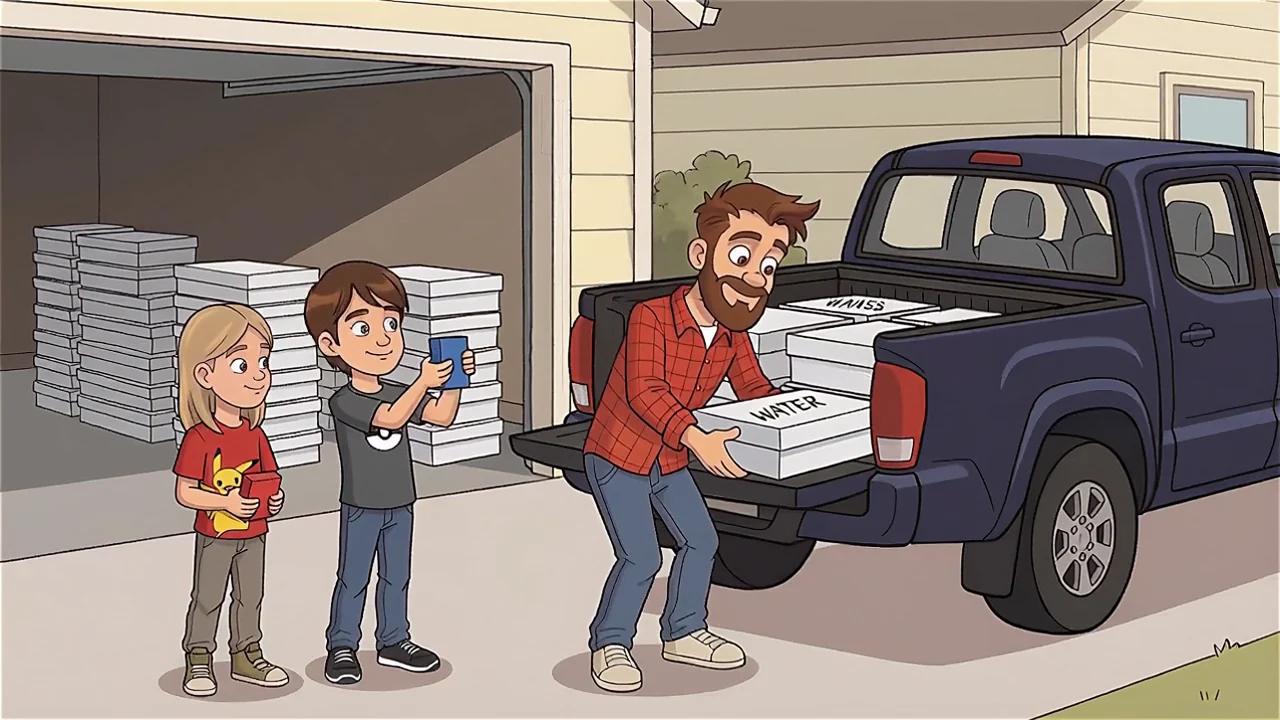
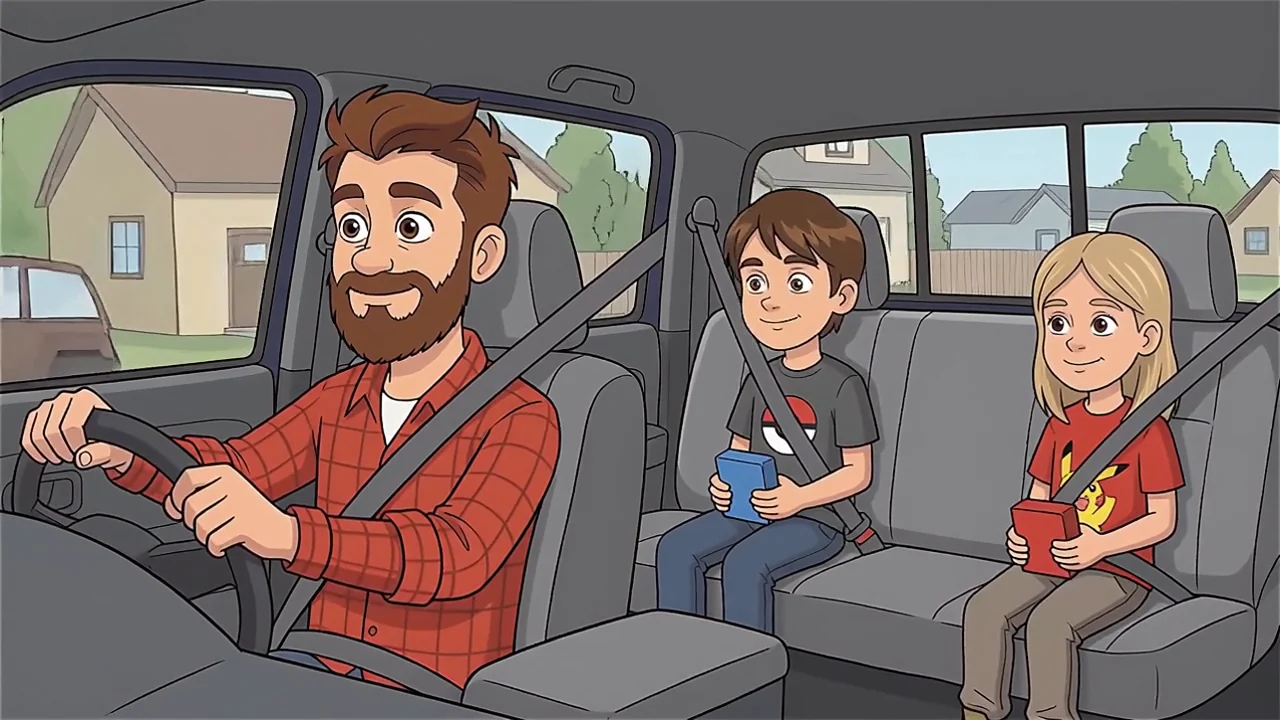
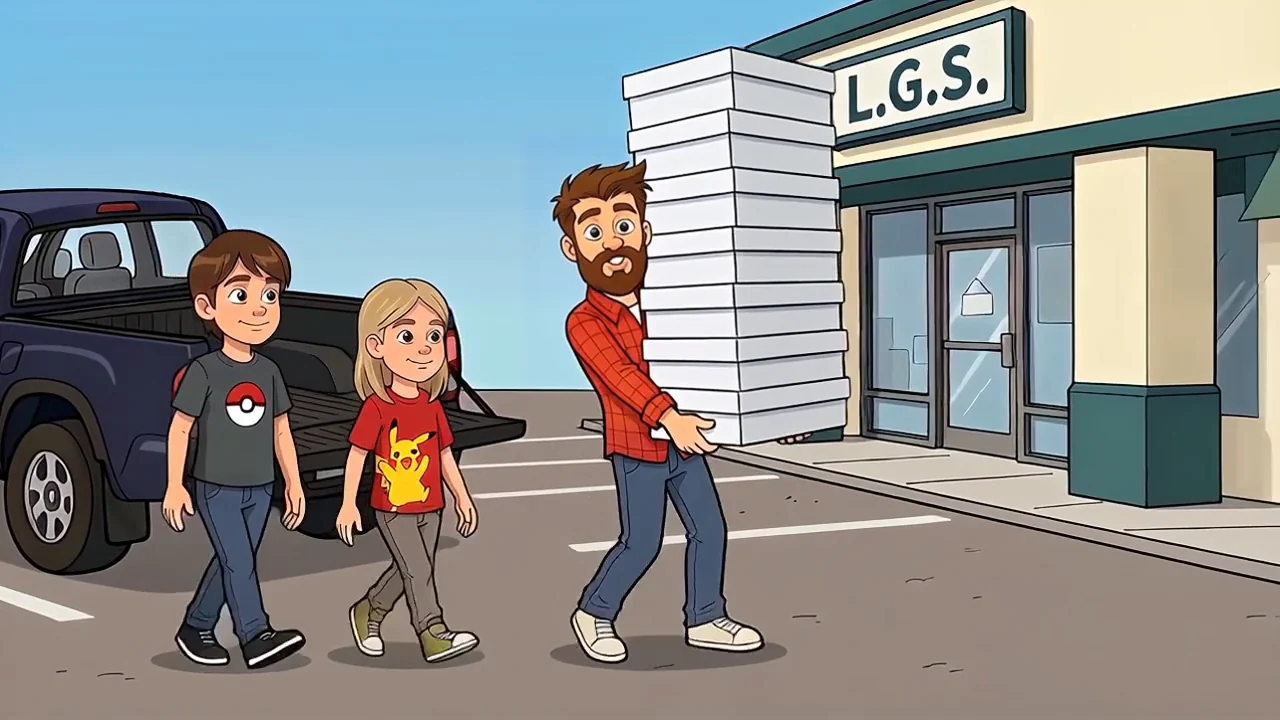
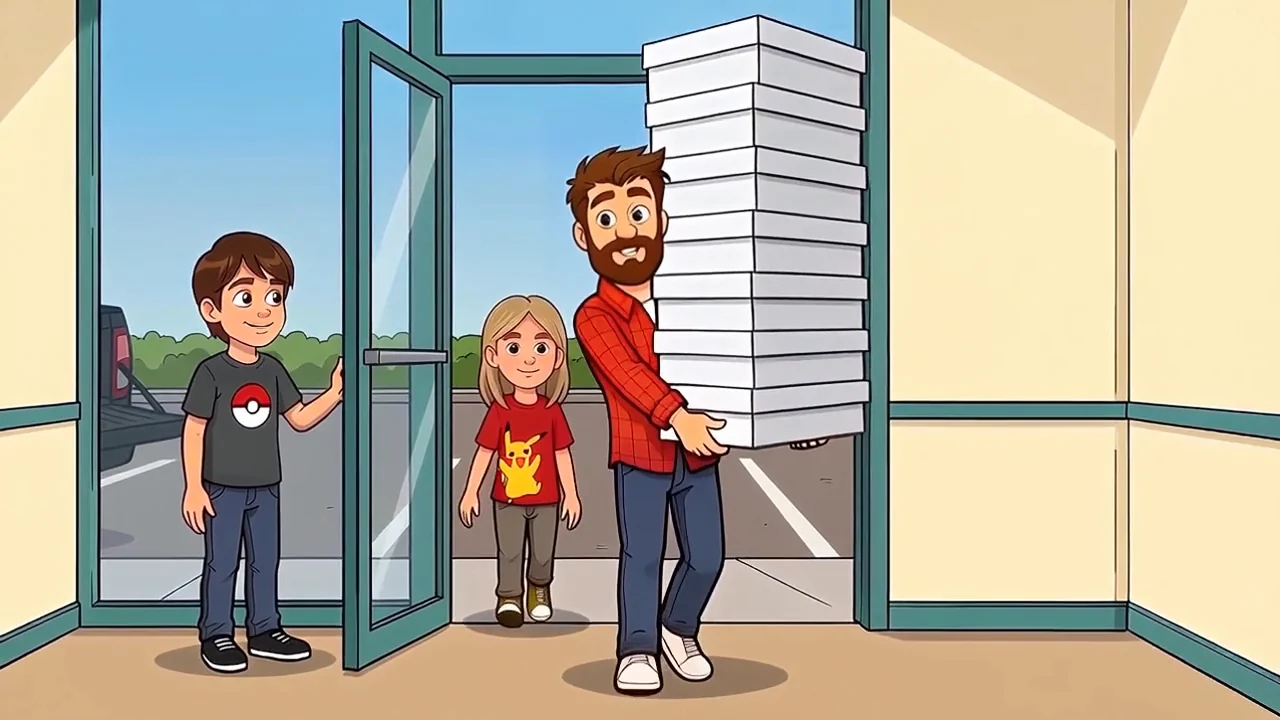
WAN 2.5 made the revised loading and driving clips. WAN 2.7 made the walking and doorway motion. We then used Sync 3 with isolated vocals to repair Dad's lip sync. Only Dad's region received that repair; the kids stayed in the original footage.
Review the whole clip. A good still cannot prove stable motion or accurate lip sync. We also repaired rolled sleeves and removed a box label that changed during motion.
Models we used
| Step | Pixio model ID |
|---|---|
| Mara, Nora, and Evan portraits | pixio/nano-banana-2 |
| Dylan’s character studies, earlier sheets, scene stills, and repairs | pixio/nano-banana-2/edit |
| Saturday loading and driving | pixio/wan-25-preview/image-to-video |
| Saturday walking and doorway | pixio/inference.wan2-7.img2vid.v1 |
| Dad's lip-sync repair | pixio/sync-lipsync/v3 |
The October 20 run for my new profiles had 24 submissions: 23 returned images and one returned no image. The recorded extra credit charge was zero on my Maker plan, including that failed attempt. The 10,000 × 7,000 boards were assembled afterward.
The earlier September 12 image runs also recorded zero extra credits. The two Saturday Sync 3 repairs cost 165 credits in total. These are records of those runs. The subscription is paid, and model inclusion and limits can change. Check the current allowance and the returned charge before generating.
Our portrait upload exceeded a model's 10 MB limit. A smaller JPEG solved it. Check returned file types too: we requested PNG but received JPEG sheets.
Keep one approved portrait, one current sheet per character, and short written notes. Reuse them for every new scene and check the result against the portrait.
For a broader look at the production workflow, see how I use AI across a creative project. For the written instructions that travel with each character, see my guide to reusable agent skills.
Frequently asked questions
What is an AI character reference sheet?
It is one image with several views of the same character. It records the face, hair, body, clothes, expressions, and colors for later images or video. It is not a rigged 3D model.
How do I keep the face consistent?
Reuse one approved portrait and the same written traits. Give each reference a clear role. Compare every new face with the portrait. Correct specific errors before making scenes or video.
How do I add glasses without changing the character?
Use the approved uncovered face as the identity reference. Supply the frames as a separate accessory reference. Ask to change only the glasses, then compare both versions for age, eyes, nose, beard, and expression.
Does a seed or detailed prompt guarantee the same face?
No. Save the seed and settings, but keep the image reference too. Our sheets still missed panels and changed small details. Review the actual result.
Can I make these sheets without spending Pixio credits?
The October 20 Dylan profile run recorded zero extra credits with an active Maker subscription. The earlier September 12 image runs did too. The subscription is paid. Model inclusion and limits can change, so check the current allowance and actual charge before generating more.
Which image should I give the video model?
Use a reviewed scene image or portrait with a clear face. Keep the sheet as a design reference. Check the resulting motion, hands, mouth, and loop seam; a consistent still does not guarantee consistent video.
What if the video model rejects the reference?
Keep the approved character. Check the model’s supported reference format and current rules. Save the job ID and exact error, then ask the provider for a supported route. A successful clip of a different person does not solve character consistency.
Our later Nora video tests hit a reference-image rejection, even though the submitted character images came from Pixio. That result is separate from the successful Saturday footage shown here. We kept the failure records for support rather than presenting a replacement face as a success.
How do I keep several characters distinct?
Use a separate portrait and profile for each person. State which reference defines each face. A style reference should control drawing style, not replace the cast member's age, face, or clothes.